

The best Arduino board for beginners is the Arduino Uno — it has the widest tutorial support, works with every standard shield, and starts around £6.90 in the UK.
The most popular Arduino boards are the Uno, Nano, Mega 2560, Pro Mini and Pro Micro. For IoT projects, the WiFi-enabled Uno R3 and Mega 2560 + WiFi add an onboard ESP8266, best once you know the basics.
Which Arduino Board Is Best for Beginners?
The best Arduino board for beginners in 2026 is an Arduino Uno-compatible board. It has the widest tutorial compatibility, supports all standard shields, and costs as little as £6.90 in the UK. The Uno is the board that 90% of beginner tutorials are written for, making it the safest choice for anyone starting from zero.
This guide compares every Arduino board a beginner might consider, explains what actually matters when choosing your first board, and recommends the best option for different budgets and project types. If you're ready to start, see our full getting started with Arduino roadmap.
What Should I Look for in My First Arduino Board?
The most important factor when choosing your first board is tutorial compatibility. The board you buy should match the board used in the tutorials you follow. For beginners, that board is almost always the Arduino Uno.
Beyond that, four things matter: pin count (how many sensors and outputs you can connect), memory (how large a program you can write), USB connector (determines which cable you need), and physical size (whether it fits on a breadboard or needs jumper wires).
Price is rarely the deciding factor because Arduino-compatible boards are already inexpensive. The difference between a £3.90 Nano and a £6.90 Uno is negligible — the right choice depends on what you're building, not what costs less.
What Is the Arduino Uno and Why Is It Recommended?
The Arduino Uno is the standard beginner board and the most widely used Arduino in the world. It uses the ATmega328P microcontroller running at 16 MHz with 32 KB of flash memory and 2 KB of SRAM. It has 14 digital I/O pins (6 with PWM) and 6 analogue inputs.
The Uno's defining advantage is ecosystem support. Virtually every beginner tutorial, library example, and Arduino shield is designed for the Uno first. When a tutorial says "connect to pin 9" or "plug in the motor shield," it assumes you have an Uno. This removes a layer of troubleshooting that trips up beginners on less common boards.
The Uno form factor also accepts Arduino shields — expansion boards that plug directly onto the headers. Motor driver shields, relay shields, LCD shields, and Ethernet shields all snap onto an Uno without any wiring.
Kunkune stocks the Arduino Uno R3 ATMEGA328P Compatible for £6.90. It uses the same ATmega328P microcontroller as the official Arduino Uno R3, runs the same code, and works with the same shields. It has 14 digital I/O pins (6 with PWM), 6 analogue inputs, 32 KB flash memory, and runs at 16 MHz. The only difference from an official board is the CH340 USB-to-serial chip (easily handled with a free driver — see our Arduino IDE setup guide for details).
Best for: First-time learners, following online tutorials, shield-based projects, classroom use.
Limitations: Larger than the Nano, only 14 digital pins (not enough for very complex projects), no built-in wireless.
What Is the Arduino Nano and How Does It Compare?
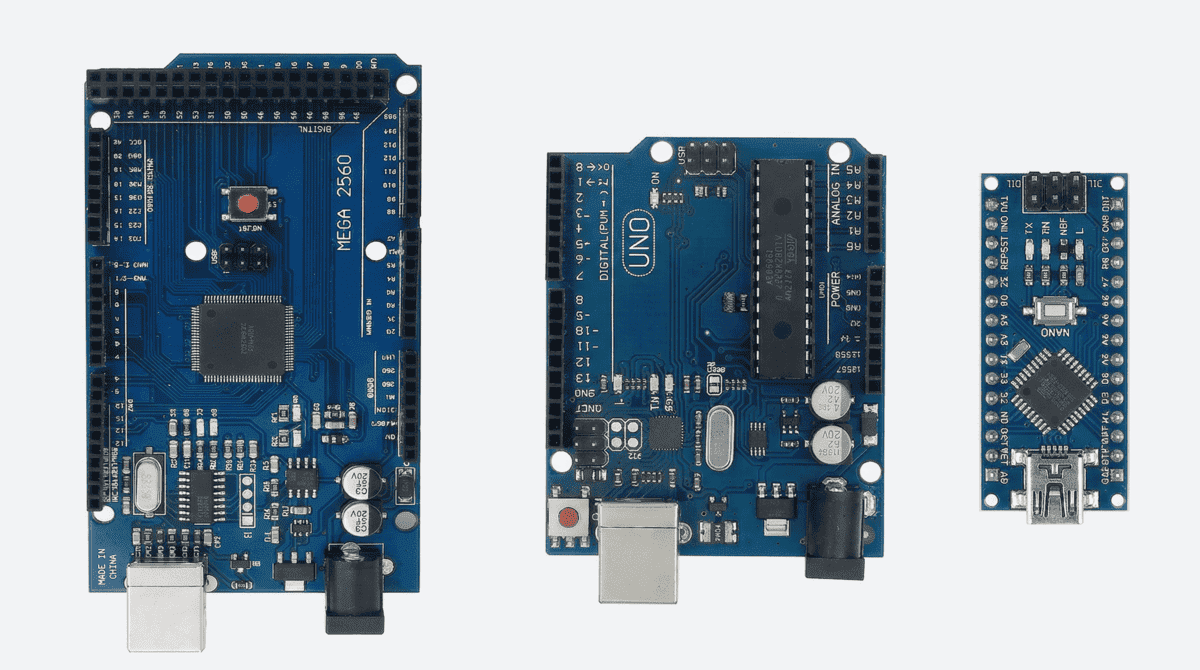
The Arduino Nano is essentially an Uno shrunk down to the size of a thumb. It uses the same ATmega328P microcontroller with the same clock speed, memory, and processing power. The key difference is size — the Nano is 45 mm × 18 mm compared to the Uno's 69 mm × 54 mm.
The Nano plugs directly into a breadboard, straddling the centre gap. This makes it brilliant for compact prototyping because the board itself becomes part of the breadboard circuit — no jumper wires needed to reach the pins. The Nano also has two additional analogue inputs (A6 and A7) compared to the Uno.
The trade-off is that the Nano cannot accept Arduino shields. If a tutorial uses a shield, you'll need to wire each connection manually instead of plugging it in. For beginners following Uno-based tutorials, this adds unnecessary complexity.
Kunkune stocks the Arduino Nano V3.0 Compatible for £3.90. Available with or without pre-soldered headers.
Best for: Compact projects, breadboard-heavy prototyping, second board after learning on an Uno, embedded projects where size matters.
Limitations: No shield compatibility, smaller headers can be fiddly, some beginners find the mini-USB connector less convenient than the Uno's USB-B.
What Is the Arduino Mega and When Do I Need One?
The Arduino Mega 2560 is the heavy-duty option. It uses the ATmega2560 microcontroller with 256 KB of flash memory (8× the Uno), 8 KB of SRAM (4× the Uno), and 54 digital I/O pins (nearly 4× the Uno). It also has 16 analogue inputs and 4 hardware serial ports.
You need a Mega when your project runs out of pins or memory on an Uno. Common examples include 3D printers (the RAMP board runs on a Mega), large LED matrix displays, robotics projects with many servos and sensors, and data logging systems that store values in arrays.
Most beginners will never need a Mega for their first year of projects. If you're starting out, buy an Uno. When you hit a project where the Uno doesn't have enough pins or your sketch won't compile because of memory limits, that's when you upgrade to a Mega.
Kunkune stocks the Arduino Mega 2560 Compatible from £12.90. There's also a Mega 2560 PRO Embedded version with a smaller footprint for projects where space is tight but pin count still matters.
Best for: Complex projects with many sensors/motors, 3D printers, LED matrices, multi-serial device projects.
Limitations: Large physical size, higher price, overkill for 95% of beginner projects.
Should I Buy a Pro Mini or Pro Micro?
The Pro Mini is the smallest Arduino-compatible board available. It uses the same ATmega328P as the Uno but strips away the USB port and voltage regulator to save space. You need an external USB-to-serial adapter (FTDI or CH340 breakout) to program it.
The Pro Micro uses the ATmega32U4, which has built-in USB support. This means it can act as a keyboard or mouse when connected to a computer — useful for custom input devices, macro pads, and game controllers. It's a niche board, not a general beginner board.
Kunkune stocks the Pro Mini Compatible from £3.90 (available in both 3.3V and 5V versions).
Best for: Permanent installations where the board stays embedded in a project, custom USB devices (Pro Micro), battery-powered projects where power efficiency matters.
Not recommended for: First-time beginners. The Pro Mini requires extra hardware to program, and the Pro Micro uses a different microcontroller that behaves slightly differently from the Uno.
Which Arduino Board Has Built-in WiFi?
If you know you want wireless connectivity from day one, Kunkune stocks the UNO WiFi R3 (ATmega328P + ESP8266) for £12.90. This board combines a standard Uno with a built-in ESP8266 Wi-Fi module. A DIP switch lets you swap between programming the ATmega328P and the ESP8266.
There's also a Mega 2560 + WiFi R3 Compatible for £19.90, combining Mega pin count with Wi-Fi connectivity.
These are useful boards, but they add complexity. The dual-processor design means you need to understand which processor you're programming and how they communicate. For pure beginners, it's simpler to learn Arduino basics on a standard Uno first, then add wireless later with an ESP32 board.
Best for: IoT projects, weather stations, smart home devices — once you already understand Arduino basics.
Not recommended as a first board. Learn the fundamentals on a standard Uno, then move to wireless.
Should I Buy Official Arduino or a Compatible Clone?
As a beginner, the question is simple: do you want to spend £6.90 or £20+ for the same learning experience? Compatible boards use the same ATmega328P chip, run identical code, and work with the same IDE and shields. The only practical difference is the USB-to-serial chip — clones use CH340, which needs a free driver on some systems.
Official Arduino boards like the Uno R4 Minima (~£20) and R4 WiFi (~£27) offer newer 32-bit hardware and USB-C. They're worth considering once you know Arduino is for you. But for your first board — the one you'll experiment on, possibly short-circuit, and definitely learn on — a £6.90 compatible Uno is the sensible starting point.
Arduino Board Comparison — Beginner's Quick Reference
| Feature | Uno | Nano | Mega 2560 | Pro Mini | Pro Micro |
|---|---|---|---|---|---|
| Chip | ATmega328P | ATmega328P | ATmega2560 | ATmega328P | ATmega32U4 |
| Clock | 16 MHz | 16 MHz | 16 MHz | 16 MHz (5V) / 8 MHz (3.3V) | 16 MHz |
| Flash | 32 KB | 32 KB | 256 KB | 32 KB | 32 KB |
| SRAM | 2 KB | 2 KB | 8 KB | 2 KB | 2.5 KB |
| Digital pins | 14 (6 PWM) | 14 (6 PWM) | 54 (15 PWM) | 14 (6 PWM) | 18 (5 PWM) |
| Analogue inputs | 6 | 8 | 16 | 6 | 12 |
| USB | USB-B | Mini-USB | USB-B | None (needs adapter) | Micro-USB / USB-C |
| Size | 69 × 54 mm | 45 × 18 mm | 102 × 54 mm | 33 × 18 mm | 33 × 18 mm |
| Kunkune price | £6.90 | £3.90 | from £12.90 | £3.90 | £6.90 |
| Best for | Beginners, tutorials, shields | Compact builds, 2nd board | Complex projects, 3D printers | Permanent installs, battery | Custom USB devices, macros |
| Buy Now | Buy Now | Buy Now | Buy Now | Buy Now |
Prices reflect Kunkune UK pricing as of April 2026 for compatible boards. All boards use CH340 USB chip except the Pro Mini (no USB) and Pro Micro (native USB via ATmega32U4).
Should I Buy a Board or a Starter Kit?
If you're a complete beginner, a starter kit saves time and money. Kunkune's Arduino-compatible starter kits start from £12.90 and include a board plus all the components you need for your first projects — breadboard, jumper wires, LEDs, resistors, sensors, display, servo motor, and tutorial booklet. Once you're ready to expand, pair your board with Arduino sensors to build real-world projects.
Buying components individually costs more and requires you to know exactly what you need before you've learned what you need. A kit eliminates that problem.
If you already have components from a previous kit or project, buying just the board makes sense. But for first-timers, a kit is the faster path.
The Bottom Line
Buy an Arduino Uno-compatible board. It's the board every tutorial uses, every shield fits, and every beginner should start with. Kunkune's Uno compatible costs £6.90 and does everything an official Uno R3 does. Once you outgrow it, the Nano, Mega, and ESP32 are waiting — and the skills you learned on the Uno transfer directly.