

Most beginner guides recommend stations with too many features, too little power, or both. This one doesn't. Three picks, all from UK stock, all under £70 — chosen for how they feel on day one and how long they stay useful as skills develop. It's part of our complete best soldering irons & stations UK guide.
Want to practise on something disposable before you touch a real board? A learning kit is ideal — see the best soldering kit for beginners and our range of soldering practice kits.
The YIHUA 926LED-IV at £32.50 is the best soldering station for beginners in the UK. Three pre-set temperature channels remove the guesswork, the included helping hands free both hands for the joint, and 60W PID control handles everything from first attempts to SMD work years later. If you want slightly more power and don't need the presets, the YIHUA 937D+ at £39 is the better pick.
UK stock · same-day dispatch before 2pm · free delivery over £25 · 12-month guarantee · 60-day returns
Best Soldering Stations for Beginners — UK Picks
| Use Case | Station | Price | Why | |
|---|---|---|---|---|
| Best overall for beginners ⭐ | YIHUA 926LED-IV | £32.50 | 3 pre-set channels, helping hands, PID, 60W | Buy → |
| Best if you want more power | YIHUA 937D+ | £39 | 75W PID, Hakko tips, LED indicator, simpler | Buy → |
| Best step-up station | YIHUA 939D+ III EVO | £69.50 | 110W, LED magnifier, 4 memory channels | Buy → |
All ship from UK stock. Same-day dispatch before 2pm. 12-month guarantee. Browse all soldering stations → · Comparing across all budgets? See our Best Soldering Stations UK 2026 guide.
What Beginners Actually Get Wrong
I've watched people fail at soldering with a perfectly good iron because of easily fixable problems. These aren't skill issues — they're equipment and setup issues, and most are covered in the golden rule of soldering.
- Cold iron, impatient soldering. Cheap fixed-temperature irons take 3–5 minutes to fully stabilise. Beginners solder at 60 seconds and wonder why joints look dull and grey. A PID-controlled station is at working temperature within 30–60 seconds, reliably.
- Wrong tip, wrong job. Most starter kits include a conical (pointy) tip. It looks precise. It isn't — the tiny contact area means poor heat transfer and frustration. The chisel tip that comes with the 926LED-IV and 937D+ is the right starting point for 90% of beginner work.
- No helping hands, no stability. Trying to hold a component, feed solder, and hold the iron simultaneously is why beginners burn themselves and produce bad joints. Helping hands fix this. The 926LED-IV includes them; the 937D+ doesn't.
The Stations in Detail
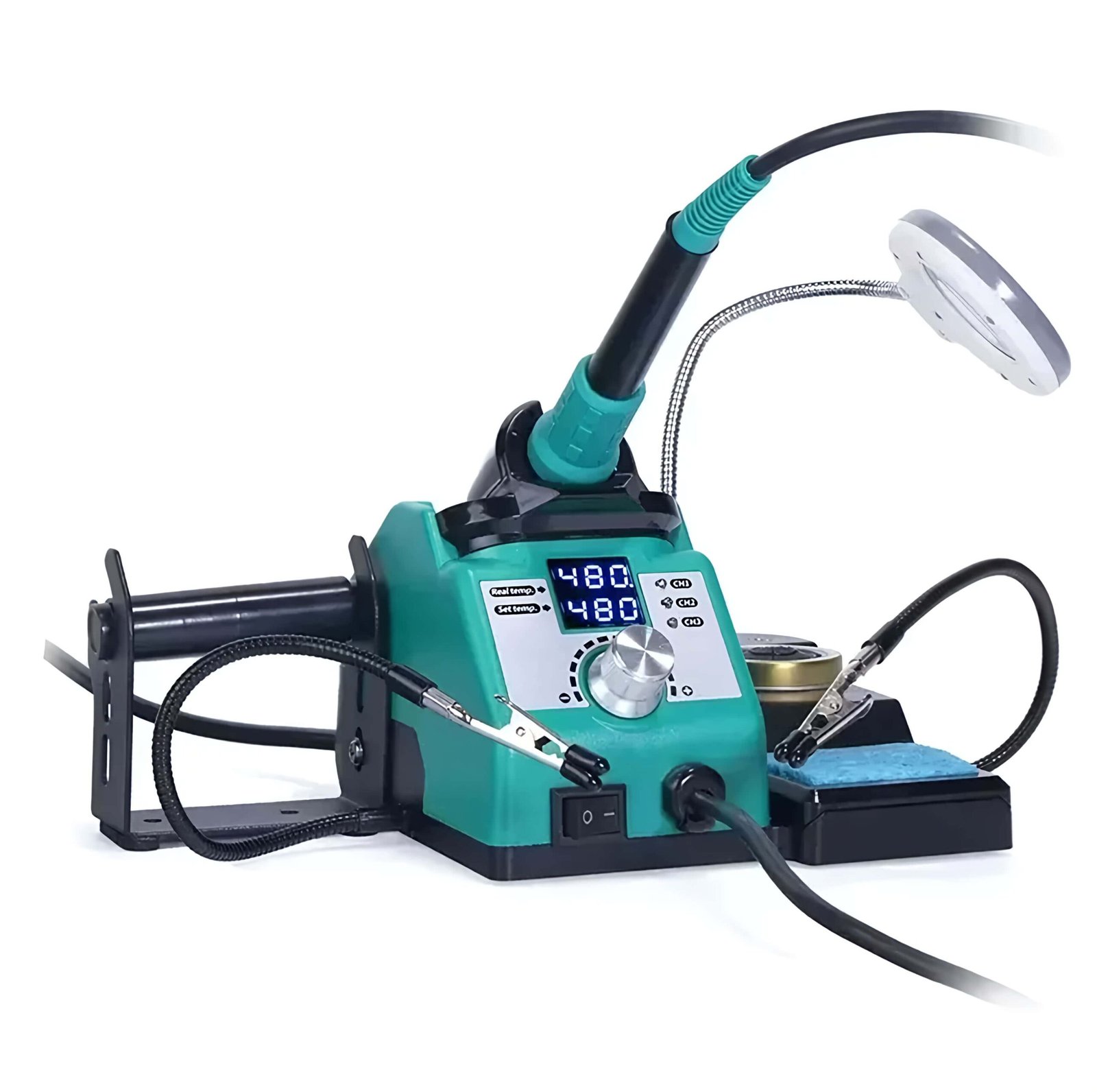
YIHUA 926LED-IV — Best for Beginners
60W | PID | 3 pre-set channels | Helping hands included | £32.50
The three pre-set temperature channels are genuinely useful when you're learning. You set it to the right channel for your solder type and get on with the joint — no guessing what 350°C looks like on a dial. PID control keeps the tip stable; sleep mode extends tip life when you put the iron down between joints. The included helping hands is the detail most people don't appreciate until they try to hold a PCB with one hand, feed solder with the other, and still apply the iron. The 90°C–480°C range covers lead-free solder, fine SMD work, and everything in between — you won't outgrow it quickly.
Best for: absolute beginners, Arduino kits, school and college projects, anyone who wants the station to do some of the thinking.
Key Features:
- • 60W PID control keeps the tip steady for clean joints.
- • 3 pre-set temperature channels — no dial guessing.
- • Helping hands included for stable, two-handed work.
- • 90°C–480°C range; sleep mode extends tip life.
- • Chisel tip and brass-wool cleaner included. UK stock.
Best Applications:
- • A first station for students and beginners.
- • Arduino kits and through-hole assembly.
- • School, college and hobby projects.
- • A complete ready-to-solder setup under £40.

YIHUA 937D+ — Best if You Want More Power
75W | PID | Hakko 900M-compatible | LED indicator | £39
Our top budget pick, and a strong beginner option if you'd rather have power than presets. At 75W it has more thermal headroom than the 926LED-IV — useful for ground planes, large pads, and connectors where a 60W iron struggles to recover. Same standard Hakko 900M-compatible tips, an LED that tells you when the iron has reached set temperature, and an anti-static design. No pre-set channels and no helping hands — just a straightforward, reliable 75W PID station. If you want simplicity and a little more power over beginner-friendly extras, the 937D+ is the better pick.
Best for: beginners who want fewer features but more power, repair techs starting out, a travel/backup iron.
Key Features:
- • 75W PID control — more headroom than 60W.
- • Hakko 900M-compatible tips (cheap UK replacements).
- • LED ready indicator; anti-static design.
- • Simple, no-frills operation.
- • UK stock, 12-month guarantee.
Best Applications:
- • Beginners who want power over presets.
- • Ground planes and larger pads.
- • Repair techs starting out.
- • A reliable travel or backup iron.
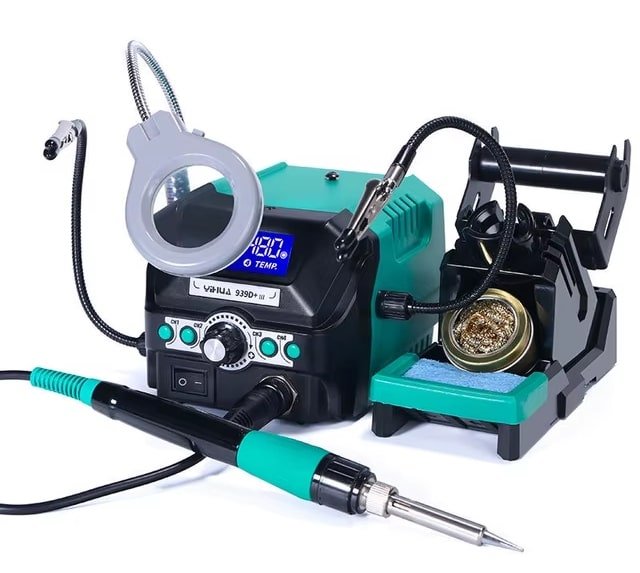
YIHUA 939D+ III EVO — When You're Ready to Step Up
110W | LED magnifier | 4 memory channels | Auto-hibernation | £69.50
Not a beginner station, but the natural upgrade when the 926LED-IV or 937D+ stops feeling like enough. 110W with a 4-core heating element — equivalent to 150W on heavy joints. Integrated LED magnifier lamp for fine work, four memory channels for different job temperature profiles, plus auto-hibernation and auto-shutoff. Buy the 926LED-IV first; if in six months you're doing SMD work regularly or hitting ground planes that resist the 60W iron, our soldering station buying guide covers when to step up.
Best for: intermediate hobbyists, regular bench work, a step-up from a first station.
Key Features:
- • 110W 4-core element — ~150W equivalent on heavy joints.
- • Integrated LED magnifier lamp.
- • 4 memory channels for temperature profiles.
- • Auto-hibernation and auto-shutoff.
- • UK stock, 12-month guarantee.
Best Applications:
- • Intermediate hobbyists and regular bench work.
- • Frequent SMD work under magnification.
- • Switching between lead and lead-free profiles.
- • A step-up from a first station.
What You Need Beyond the Station
A soldering station is one item in a functional setup. These are the other things you need — most beginners discover them the hard way.
- Solder wire. Start with 60/40 leaded solder with rosin flux core (0.6mm or 0.8mm). It melts at a lower temperature than lead-free, flows more easily, and is more forgiving on technique — for learning, it removes one variable. Browse solder wire, and see leaded vs lead-free when you're ready to switch. For exact settings, see the soldering iron temperature guide.
- Flux. A flux pen or small jar of no-clean flux makes a big difference on stubborn joints — when solder won't flow onto a pad, flux is usually the fix. A £3–5 flux pen is the next addition after the kit; browse soldering supplies & spares.
- Brass wool tip cleaner. Both recommended stations use brass wool (not a wet sponge) — it cleans without the thermal shock a wet sponge causes. The 926LED-IV includes it; with the 937D+, add a small brass-wool cleaner for £3–5.
- Desoldering pump or braid. Mistakes happen. A desoldering pump (solder sucker) or copper braid removes solder from bridged or misplaced joints — you'll want one within your first three projects. New to it? Read what is a soldering pump.
- PCB holder or helping hands. The 926LED-IV includes helping hands; with the 937D+, a basic PCB holder (£5–10) stops the board sliding mid-joint.
Tip Types — What to Use and When
Both recommended stations come with a chisel tip. Use it. Here's why the other shapes in multi-tip kits aren't for beginners — and you can browse spares any time in soldering iron tips.
- Chisel tip (2–3mm) — start here. The flat end transfers heat efficiently. Through-hole components, wires, Arduino headers, connector pins — a chisel tip handles 90% of beginner work.
- Conical tip (0.8–1mm) — avoid until later. The small contact area means poor heat transfer. Most beginners reach for the pointy tip and then wonder why soldering feels harder than it should. Only useful for fine SMD work once you're comfortable with the basics.
- Bevel tip — the refinement. A chisel cut at 45°, giving a larger contact area that sits flat against pads. Useful once you move beyond basic through-hole to IC drag-soldering.
Tip Care — The One Habit That Matters Most
Tips are consumables, but good habits extend their life from weeks to months. The full routine is in how to clean soldering iron tips.
- Tin immediately when the iron reaches temperature — apply fresh solder and wipe on brass wool. The tip should be shiny silver.
- Use brass wool, not a wet sponge. A wet sponge causes thermal shock every wipe; brass wool cleans without the temperature drop.
- Tin before switching off. Leave a blob of fresh solder on the tip as it cools — it seals the surface against oxidation.
- Never leave a bare tip to cool. An oxidised tip turns black and stops transferring heat properly.
When to Upgrade
The 926LED-IV and 937D+ will handle most hobbyist work for years. The signs you've outgrown them: you're regularly working on 4-layer PCBs where the iron temperature drops on every joint; you're doing fine SMD work under magnification; or you want memory presets to switch between lead and lead-free profiles without re-dialling.
That's when the YIHUA 939D+ III EVO at £69.50 makes sense. See our budget soldering station guide for a full price-tier breakdown.
What About USB-C Smart Irons (Pinecil, TS101)?
The Pinecil V2 and Miniware TS101 are the irons online forums recommend most to beginners — tiny USB-C "smart" irons that heat in seconds and cost roughly £25–70. They're genuinely good: if you want one tool that fits in a drawer and runs off a laptop charger or power bank, they're worth a look. We don't stock those two brands, but we carry the same idea in our cordless & USB-C soldering irons (FNIRSI and YIHUA).
For a learning bench, though, a station still wins for most beginners: the YIHUA 926LED-IV gives you a proper stand, helping hands and a sponge for the same money — and there's no fiddling with USB-C power-delivery wattage to reach full heat. Our honest advice: start on a station, then add a USB-C iron later as a portable second tool, not as your first one.
Frequently Asked Questions
What is the best soldering station for a complete beginner?
The YIHUA 926LED-IV at £32.50 — pre-set temperature channels, helping hands included, real PID control, UK stock with a 12-month guarantee. After bench-testing the budget field, the helping hands alone put it ahead of every other station at this price.
Do I need a soldering station or will a basic iron do?
A basic iron (fixed temperature, no control) produces inconsistent results and frustration. A station with digital PID control costs only £5–10 more and produces dramatically better joints because the temperature stays where you set it. For electronics work, a station is worth it.
What solder should I use as a beginner?
60/40 leaded solder with a rosin flux core, 0.6–0.8mm diameter. It melts more easily than lead-free and is more forgiving while you're still developing technique. Once your joints are consistently good, switch to lead-free if needed.
Do I need desoldering equipment?
Not on day one, but within your first few projects you'll want desoldering braid (copper wick) or a desoldering pump. Braid works on flat surfaces; a pump is better for through-hole components. Both cost £3–8 and save an enormous amount of frustration.
Is Hakko or Weller good for beginners?
Both are excellent professional benchmarks — the Hakko FX-888D is user-friendly and well-built, and the Weller WE1010 is the other bench standard. But at £118+ (Hakko) and around £150 (Weller) they cost far more than the YIHUA 926LED-IV at £32.50, which covers the same ground for a beginner, adds pre-set channels and helping hands, and comes with a 12-month UK guarantee. See our full Weller vs Hakko vs YIHUA comparison.
Ready to start? The YIHUA 926LED-IV is the easiest first station — or browse the full range.
View All Soldering Stations →